Need some computer hardware advice

Welcome to our community

Be a part of something great, join today!

South East

Writing Team
Joined
Nov 17, 2009
Messages
568
Likes
453
Points
63
I am trying to build a video converter and need some help on which processor to use. Anybody good with computer hardware that can give some advice?

 
I am trying to build a video converter and need some help on which processor to use. Anybody good with computer hardware that can give some advice?


Get as much processor as you can afford. Same as ram.

i7 w/32gigs ran would do you nicely. If you can't afford that then i5 w/32gigs, then i5 w/16gigs.
 
I am running an 17 with 16 gig of ram. Sometimes I do some small video editing and I record 32 channels of audio at once and never a glitch.
 
Amazon product ASIN B01L3J1JFQ
Amazon product ASIN B015YPB8ME
Amazon product ASIN B0136JONG8
Amazon product ASIN B01LXS4TY6
Blazing fast build for not that much money. You can use a 4K TV as a monitor.

It's not going to play video games, but for video editing it should be perfect.

The NVME drive is 6x faster than a fast SSD, so reading and writing video files will be fast. You can get a regular hard drive for $100 to store the big files when you don't need to be accessing them regularly.


All those parts take just a few minutes to put together. You'd have to install Windows if that's the OS you use.

If you have the money to spend, the 5K iMac is a good choice. Room for your 4K video in a window with window borders and tool windows on the screen at the same time. It has NVME for disk and thunderbolt. You might add a few thunderbolt drives to read/write big video files.
 
Amazon product ASIN B01L3J1JFQ
Amazon product ASIN B015YPB8ME
Amazon product ASIN B0136JONG8
Amazon product ASIN B01LXS4TY6
Blazing fast build for not that much money. You can use a 4K TV as a monitor.

It's not going to play video games, but for video editing it should be perfect.

The NVME drive is 6x faster than a fast SSD, so reading and writing video files will be fast. You can get a regular hard drive for $100 to store the big files when you don't need to be accessing them regularly.

But apparently it can't post Amazon links in a forum.
 
The ASRock is 6"x6"x3.5". A lot of capability in a tiny package. It has vesa mount so you can bolt it to the back of your monitor.
 
Are the rest broken, too?

Be sure to get the i7 6700 and not 6700k or with other letters following the 6700. The setup only allows 65W CPUs.

This CPU is maybe 5% faster than the one in my iMac or MacBook Pro. It comes with a cooling fan, so you don't need to buy one separate. Don't get the OEM version or you will need to buy a CPU cooler/fan.

The NVME is up to 3x faster.


upload_2017-1-11_7-54-5.png

upload_2017-1-11_7-54-23.png
 
Are the rest broken, too?

Be sure to get the i7 6700 and not 6700k or with other letters following the 6700. The setup only allows 65W CPUs.

This CPU is maybe 5% faster than the one in my iMac or MacBook Pro. It comes with a cooling fan, so you don't need to buy one separate. Don't get the OEM version or you will need to buy a CPU cooler/fan.

The NVME is up to 3x faster.


View attachment 11801

View attachment 11802

These display too.
 
Most decent PCs you get are going to be able to handle video fine. One thing to look into is whether your conversion software can utilize more than one core at a time. If not (I guess probably not), you'd be better off with fewer faster cores that are faster.

 
Most decent PCs you get are going to be able to handle video fine. One thing to look into is whether your conversion software can utilize more than one core at a time. If not (I guess probably not), you'd be better off with fewer faster cores that are faster.

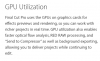
I'd think the really good software uses all your CPU cores and any support the GPU can provide.

The I7 6700 has built in GPU. Not good enough for video games, but likely just fine for video editing.

I don't edit video, but I do know people rave about Final Cut Pro for the Mac.

Here's a link to reviews of several video editing tools for all platforms:

http://www.pcmag.com/article2/0,2817,2397215,00.asp

Here's a link to Final Cut Pro:
http://www.apple.com/final-cut-pro/what-is/

And it states:
upload_2017-1-11_8-20-58.png

AND

upload_2017-1-11_8-21-33.png
 
Amazon is probably rate limiting so 5 links x everyone viewing is a lot of fetches in too short a time.
 

Now a few of them just have a generic Amazon link to nothing but a home page.

However the ones below I can still see.


Are the rest broken, too?

Be sure to get the i7 6700 and not 6700k or with other letters following the 6700. The setup only allows 65W CPUs.

This CPU is maybe 5% faster than the one in my iMac or MacBook Pro. It comes with a cooling fan, so you don't need to buy one separate. Don't get the OEM version or you will need to buy a CPU cooler/fan.

The NVME is up to 3x faster.


View attachment 11801

View attachment 11802
 
even in the quoted link above, it directs me to the specific part Denny is referencing. But the image is gone and it is just a red text link.
 
I see every one.

Do you see dead people too?
sixth_large.jpg
 
And I just scrolled through and I see them all again. No generic Amazon link.
 
I'm actually looking to create a small portable video converter and need advice on the chip to use to run it. I know it will run on all the i3, i5 or i7's but I want to know if based on the SDK it will run on an atom chip.

 
I have an executable file that runs on Ubuntu and I'm trying to run it but it is not running. I was told to add maybe you need add chmod +x but I don't know where or how to do that. Any insight?
 
Atom chip is REALLY slow. The device I suggested is 6"x6"x3.5". VERY portable.


At the command line:

Code:
$ chmod +x /path/to/file
 
Without reading through this, all you need to know is this:

Just buy yourself a new keyboard, don't worry about cleaning the old one.
 

Users who are viewing this thread

Back
Top